Search for “MacWhisper alternative” and almost every result is a dictation app: Voibe, LumeVoice, EmberType, Whisperly. That’s fine if you use MacWhisper to talk into a text field. It’s useless if you use it to record and transcribe meetings, which is what a lot of people now buy it for.
This list is for the meeting case. I compared five apps on what matters after a call ends: where the audio is transcribed, whether a bot joins, how speakers are labelled, whether you get a summary without extra setup, and what it costs over time.
Disclosure up front: I build TranscribeX, which is on this list. I’ve tried to describe every app from its own documentation, checked October 2026, and to say plainly where each one beats mine.
Short answer
- Local, automatic meeting notes on a Mac: TranscribeX ($39 once).
- Free and open source, and you don’t mind some setup: Meetily or Anarlog.
- Dictation first, meetings sometimes: Superwhisper.
- You don’t need local processing and want team features: Granola.
- MacWhisper itself got much better at meetings in September 2026. Check whether you still need to switch.
Is MacWhisper good for meetings now?
Better than a year ago. MacWhisper Pro detects meetings in Zoom, Teams, Webex, Discord and other apps, records them without a bot, and since version 15.2 (September 2026) shows a live transcript and labels up to eight speakers with NVIDIA’s Nemotron diarization model. It also runs Whisper, Parakeet and Qwen3 ASR locally.
So the reasons people still look for an alternative are narrower than they used to be:
- Summaries need setup. MacWhisper summarizes through your own OpenAI, Anthropic or Google API key, or a local model you run in Ollama or LM Studio.
- The work after the meeting is manual. I couldn’t find automatic post-meeting summaries, emailed recaps or calendar matching on MacWhisper’s site. That doesn’t prove they’re missing, only that they aren’t advertised.
- Eight speakers is the ceiling for diarization, which matters for all-hands and big team calls.
- Price. MacWhisper Pro is €64 once. That’s fair for what it does, but some alternatives are free or cheaper.
If none of those bother you, stay with MacWhisper. If one does, read on. For a feature-by-feature table of the two apps, see TranscribeX vs MacWhisper.
What to look for in a meeting transcription app for Mac
These are the questions that separate meeting tools from each other. Most listicles skip them.
- Where does transcription run? On your Mac, or on someone’s server. “Bot-free” doesn’t mean local: Granola and Wispr Flow capture audio on your Mac and still transcribe it in the cloud.
- Does it start by itself? If you have to remember to press record, you’ll miss the meeting that matters.
- Who said what? Speaker diarization splits the transcript by voice. Better apps also remember recurring people, so “Speaker 2” becomes a name.
- Is the summary built in? Or do you need an API key, a local model server, or a separate app?
- What does it cost after three years? A $14 monthly plan is $504 by then. A one-time license is the same price in year three as in year one.
MacWhisper alternatives compared
| App | Transcription | Starts by itself | Speaker labels | Summaries | Price |
|---|---|---|---|---|---|
| TranscribeX | On your Mac | ✓Pro | ✓No speaker limit, Voice Profiles (Pro) | Built-in local model, or your own provider | Free; Pro $39 once |
| Meetily | On your Mac | ✓Pro | ✓Pro | Ollama, or a cloud API key | Free (open source); Pro $120/year |
| Anarlog (ex-Hyprnote) | On your Mac (cloud on Pro) | ?Not stated | Manual labelling (free) | Local model via Ollama or LM Studio, or your own key | Free; Pro $140/year |
| Superwhisper | On your Mac or cloud | ✗Manual start | ✓Pro, not carried into summaries | AI “Meeting Mode” (Pro) | $84.99/year or $249.99 lifetime |
| Granola | Cloud | ?Not stated | ?Not stated | Built in (cloud) | Free (30-day history); $14/month |
| MacWhisper, for reference | On your Mac | ✓Pro | ✓Up to 8 speakers (Pro) | Your API key, or Ollama / LM Studio | Free; Pro €64 once |
From each vendor’s website and docs, checked October 2026. “Not stated” means I couldn’t confirm it from public pages, not that the feature is missing.
1. TranscribeX: local meeting notes that finish themselves
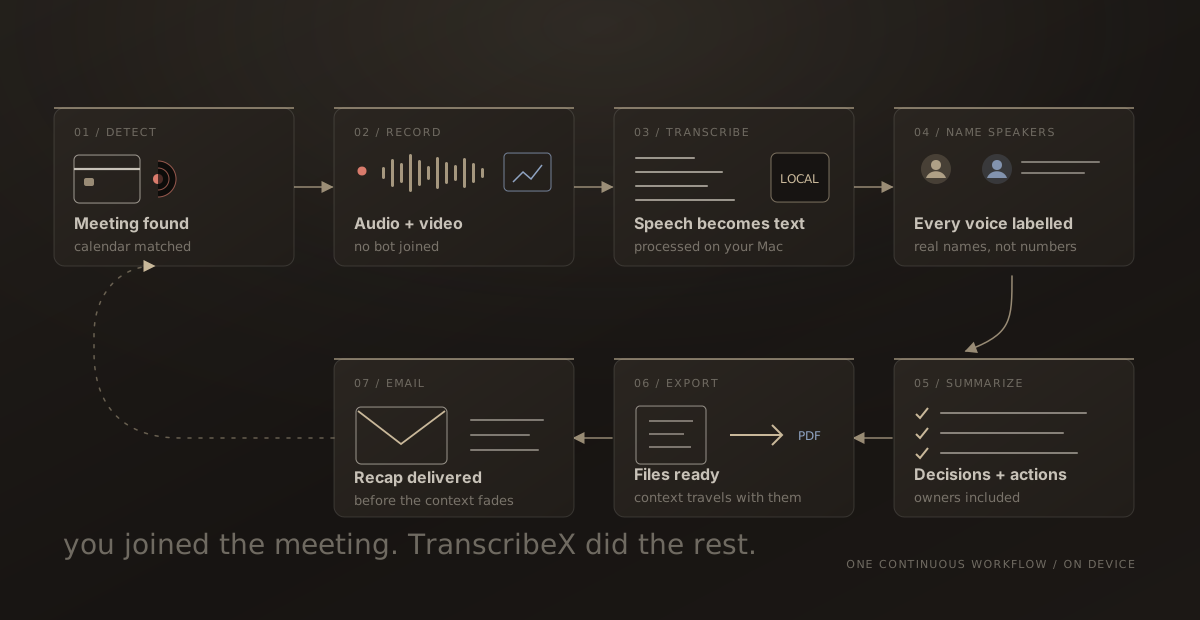
TranscribeX runs the same kinds of local models as MacWhisper (Whisper, NVIDIA Parakeet, Qwen3 ASR, Nemotron and Apple’s on-device recognizer), and focuses on what happens after the call. With Pro, it detects a meeting in Zoom, Teams, Google Meet, Slack, Discord, Webex or any app you add, matches it to your calendar event, records audio and optionally video, transcribes on your Mac, names the speakers, writes a summary, exports it and can email the recap. Each step can be switched off.
Three things set it apart from MacWhisper for meetings:
- Summaries with no setup. A small language model downloads inside the app in one click. No API key and no Ollama. You can still connect ChatGPT, Gemini, Ollama or LM Studio if you prefer.
- No speaker ceiling. Diarization runs the pyannote community-1 pipeline on the Neural Engine, detects how many people spoke, and Voice Profiles name recurring people automatically.
- $39 once, with a free version that transcribes files and microphone recordings without limits.
Where it falls short: it’s Mac only, with no iPhone app. It has no built-in Notion or Zapier connection (you get file exports, a CLI and an MCP server instead). And the meeting automation and AI summaries are Pro features, not free ones.
“TranscribeX has been great! I am on 20+ calls weekly and this tool has become invaluable for call transcripts, and without any subscription or sending my data off to the cloud! I've emailed support on a few occasions and Ethan has been extremely responsive, top notch support!”
2. Meetily: open source, if you’re comfortable with Ollama
Meetily is an open-source (MIT) meeting recorder that transcribes locally with Whisper or Parakeet and writes summaries through Ollama or a cloud provider of your choice. It records your microphone and system audio together, with no bot, and runs on macOS and Windows.
The free Community edition covers local transcription and summaries. Speaker diarization, speaker naming and automatic meeting detection are in Meetily Pro, which costs $120 per device per year. So the free version is a good fit if you start recordings by hand and don’t need speaker labels.
Choose it if you want to read the source code, or need Windows. TranscribeX vs Meetily in detail.
3. Anarlog (formerly Hyprnote): local-first and free
Anarlog is the app that started as Hyprnote, was briefly called Char, and settled on Anarlog in 2026, which is why search results are confusing. It’s an open-source, local-first notepad for meetings: no bot, on-device transcription with no minute cap on the free plan, and summaries through Ollama, LM Studio, Apple Intelligence or your own API key.
Speaker labelling is manual on the free plan. Anarlog Pro ($140 a year) adds cloud transcription, cloud sync across three devices and sharing. The Mac app is the most mature; Windows and Linux are in beta.
Choose it if you like Granola’s notepad style but want transcription on your own machine. TranscribeX vs Anarlog in detail.
4. Superwhisper: dictation first, meetings on the side
Superwhisper is one of the best dictation apps on the Mac, and it has a meeting mode. You start a recording with system audio turned on, and Pro can separate speakers and turn the result into minutes. Its docs are clear about the limits: there’s no automatic meeting detection, and speaker labels show up in the history view but not in the AI summary.
All Whisper models are free in Superwhisper. System audio, speaker separation and AI modes need Pro at $84.99 a year or $249.99 lifetime, and the most accurate speaker separation uses cloud models.
Choose it if you dictate all day and record the occasional call. TranscribeX vs Superwhisper in detail.
5. Granola: polished, bot-free, but in the cloud
Granola is on this list because many people who search for MacWhisper alternatives really want “meeting notes without a bot”, and Granola does that very well. It captures your device audio, so nothing joins the call, and its notepad blends your own notes with the AI summary.
It isn’t local. Granola’s security page says audio is transcribed by cloud providers and summarized by OpenAI and Anthropic, then deleted. The free plan keeps 30 days of history; Business is $14 per user per month. In return you get team folders, CRM integrations and mobile apps, none of which a local Mac app offers.
Choose it if local processing isn’t a requirement and you share notes with a team. TranscribeX vs Granola in detail.
Not for meetings: VoiceInk and Aiko
Both show up in MacWhisper alternative lists, and both are good apps, but neither records meetings.
- VoiceInk ($25 once, open source) is a fast local dictation app with a wide choice of models. Its docs don’t mention system audio, meeting recording or speaker labels. More on VoiceInk.
- Aiko ($24 once) transcribes files you import, using Whisper Large v2, on Mac, iPhone and iPad. No live transcription, no speakers, no summaries. More on Aiko.
If your MacWhisper use is mostly dictation or the occasional file, one of these may be all you need.
How to test a MacWhisper alternative in 20 minutes
Feature tables only go so far. This is the test I’d run before paying for anything:
- Take one real recording you already transcribed in MacWhisper, ideally a call with three or more people.
- Run it through the alternative with the same model size (for example Whisper Large V3 Turbo or Parakeet V3). Accuracy should be close, because the model does the recognition, not the app.
- Compare what you get around the transcript: are speakers split correctly, is there a summary, how many clicks did it take?
- Join a short test call with a colleague (and tell them you’re recording). Check whether the app noticed the meeting by itself.
MacWhisper alternatives FAQ
Is there a free MacWhisper alternative?
Yes. Meetily’s Community edition and Anarlog are free and open source, and both transcribe meetings locally. TranscribeX’s free version transcribes files and microphone recordings without limits, though its automatic meeting features are in Pro.
What is the best open-source MacWhisper alternative?
For meetings, Meetily (MIT) and Anarlog (MIT) are the main open-source options. For dictation, VoiceInk (GPL-3.0) is the closest open-source alternative.
Does MacWhisper have speaker identification?
Yes. Since version 15.2 (September 2026), MacWhisper Pro labels up to eight speakers, including during a live meeting. TranscribeX has no fixed speaker limit and can remember recurring people with Voice Profiles.
Which MacWhisper alternative works offline?
TranscribeX, Meetily and Anarlog all transcribe on your Mac without an internet connection once the models are downloaded. Superwhisper’s local Whisper and Parakeet models also work offline. Granola needs the internet, because it transcribes in the cloud.