Most AI meeting assistants work the same way. A bot joins your call as an extra participant, the audio goes to the vendor’s servers, and you pay every month. TranscribeX takes a different route. It runs as a Mac app, captures the call audio on your own machine, and does the transcription with speech recognition models that run locally.
The short version
- Nothing joins the call. TranscribeX records the system audio and your microphone on the Mac, so no extra name shows up in the participant list.
- Works with the apps you already use. Zoom, Microsoft Teams, Google Meet, Slack, Discord, Webex, browsers such as Chrome, Safari and Brave, the Phone app, and any Mac app you add.
- Local by default. Transcription, speaker recognition and summaries with the built-in language model run offline once the models are downloaded.
- One payment. The free version transcribes without limits. Pro, which adds automatic meeting recording, is $39 once.
Pick your meeting app
Each platform has its own built-in transcription, with its own plan requirements and host controls. These guides explain what Zoom, Google Meet and Teams offer natively, and how to transcribe each one on a Mac with TranscribeX.
An AI note taker that doesn’t join meetings
Bot-based note takers have to be invited, admitted and kept in the call. That gets harder every year. Zoom now offers hosts several ways to block bots, Google Meet automatically denies third-party bots that ask to join under Trusted or Restricted access, and Microsoft Teams holds detected bots in the lobby by default until someone admits them. A bot also announces itself to everyone, which some people welcome and others find awkward.
TranscribeX is a meeting recorder that sits on your side of the call. It listens to what your Mac plays and what your microphone hears. That means it works as a participant in meetings you don’t host, and in meetings where the organizer’s plan has no transcription at all. The trade-off is that the platform shows no recording notice for it, so telling people is your job.
TranscribeX is not the only tool that works this way. Granola, MacWhisper and the desktop apps from Otter, Fathom and Fireflies can also capture a call without a bot. Where TranscribeX differs is that the transcription itself happens on your Mac and the whole job is paid for once.
From call to recap: the full pipeline
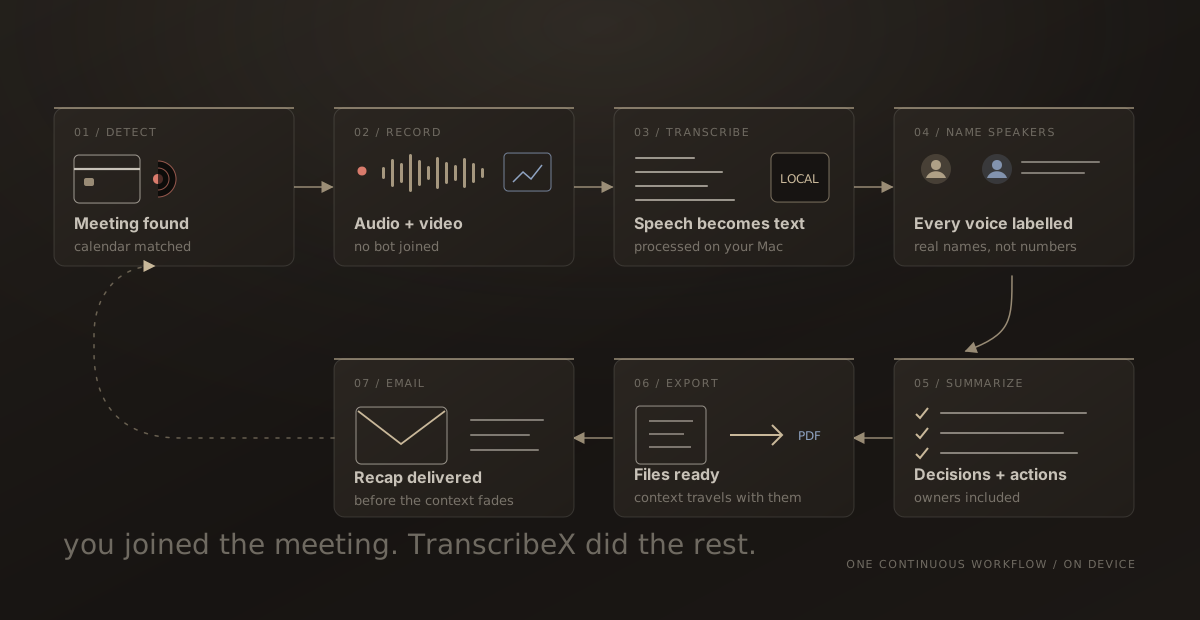
You can use TranscribeX as a plain recorder, or let it handle the whole meeting. Every step can be switched on or off.
- Detect the call when it starts in a supported app. A short start delay skips the join clicks and notification sounds.
- Match it to an event in your Mac calendars, so the recording carries the meeting title, date and participants.
- Record audio only, or audio and video if you want slides and screen shares kept with the words. You choose this per app.
- Transcribe locally with Whisper, NVIDIA Parakeet, Qwen3 ASR or Apple’s on-device model.
- Name the speakers with automatic diarization and Voice Profiles, which recognize people you have met before.
- Summarize into key points, decisions and action items, with your own notes included.
- Export and email the summary and transcript when the meeting ends, or hold them for review and send with one click.
During the call, a live transcript window shows the conversation as it happens, with an AI chat panel for questions like “what did I miss?” Live captions run on NVIDIA Nemotron streaming models in 30+ languages. The automatic meeting cycle is explained step by step here.
Offline meeting transcription and privacy
The recording is saved on your Mac first, and everything else is built from it. Speech recognition, speaker diarization and the built-in language model all run on the Mac, so a meeting can be transcribed and summarized with Wi-Fi off. Voice Profiles are stored only on your machine.
Some steps do need the internet. Sending the recap by email does, and so does choosing an online AI provider such as ChatGPT or Gemini for a summary. ElevenLabs Scribe and Mistral Voxtral are available as optional online transcription models. Those are choices you make. If you leave them off, the meeting audio never leaves your Mac.
A local AI note taker for summaries
For summaries and chat, TranscribeX can download a small language model (Qwen or Gemma) in one click, or use Apple Intelligence. It runs inside the app with no API key and no account, and there is no charge per summary. If you prefer a larger model, you can connect ChatGPT, Gemini, DeepSeek, Perplexity, Ollama, LM Studio or any OpenAI-compatible endpoint.
Because the summary is written from a transcript that already has speaker names, it can keep track of who agreed to what. You can also chat with the transcript and limit a question to one speaker.
AI note taker with no subscription
Meeting assistants usually charge per user per month. TranscribeX Pro is a single $39 payment with free updates, for one Mac at a time. Here is how that compares over one and three years with the cheapest paid plan of three popular tools.
| Plan | Billing | 1 year | 3 years |
|---|---|---|---|
| TranscribeX Pro | One-time, free updates | $39 | $39 |
| Otter Pro | $8.33/month billed annually ($16.99 monthly) | $99.96 | $299.88 |
| Granola Business | $14/month | $168 | $504 |
| Fathom Premium | $16/month billed annually ($20 monthly) | $192 | $576 |
Cheapest paid individual plan at list price (USD unless marked). Prices checked October 2026 on each vendor’s pricing page (Otter.ai, Granola, Fathom). TranscribeX Pro is a one-time purchase with free updates; the free version has no time limit.
Those subscriptions do include things TranscribeX doesn’t, such as shared team workspaces, web and mobile access to every transcript, and CRM integrations. If you need those, a subscription may be worth it. If you want your own meetings transcribed and summarized on your own Mac, $39 once covers it. See the full Otter and Granola comparisons.
“TranscribeX has been great! I am on 20+ calls weekly and this tool has become invaluable for call transcripts, and without any subscription or sending my data off to the cloud! I've emailed support on a few occasions and Ethan has been extremely responsive, top notch support!”
What’s free and what needs Pro
The free version has no time limit and no watermark. It transcribes and exports without limits using Whisper Tiny and Apple’s on-device model, records from your microphone, and imports audio and video files, so a meeting recording you already have can be transcribed for free. Automatic meeting detection, recording audio and video from any Mac app, speaker diarization, live transcription, calendar matching, AI summaries and the automatic export and email steps are part of Pro.
Local meeting transcription: FAQ
Does TranscribeX join my meeting as a bot?
No. It captures the call from your Mac, so nothing is added to the participant list. Because the platform shows no notice for it, tell participants and get their consent before you record.
Can I transcribe meetings offline?
Yes. After the models are downloaded, transcription, speaker diarization and summaries with the built-in language model run without an internet connection. Emailing the recap and online AI providers need a connection.
Which meeting apps does it work with?
Zoom, Microsoft Teams, Google Meet, Slack, Discord, Webex, meetings in Chrome, Safari and Brave, the Phone app, and any other Mac app you add to the detection list.
Do I need to be the host?
No. TranscribeX records what your Mac hears, so it works the same whether you organized the meeting or were invited to it. Built-in platform transcripts are usually controlled by the host or the organizer’s plan.
Is there a subscription?
No. The free version is free forever, and TranscribeX Pro is a one-time $39 purchase with free updates.