Google Meet runs in the browser, which makes it easy to join and harder to keep a record of. Meet’s own transcripts and Gemini notes are tied to paid Google plans and to the organizer’s settings. If you join from a personal Gmail account, or as a guest in another company’s meeting, you usually can’t start either one. This page covers what Meet offers natively and how to transcribe a Meet call on a Mac with TranscribeX.
The short version
- Meet transcripts are available on specific Workspace editions, such as Business Standard and above, and on Workspace Individual. Free personal Gmail accounts don’t get them.
- Gemini “Take notes for me” needs an eligible Workspace edition or Google AI plan, and the organizer has to have it.
- TranscribeX detects the Meet call in Chrome, Safari or Brave, captures the audio on your Mac and transcribes it there. Nothing joins the meeting.
What Google Meet’s built-in transcription requires
Meet transcripts are available on Business Standard, Business Plus, Enterprise Starter, Enterprise Standard, Enterprise Plus, Teaching and Learning Upgrade, Education Plus and Workspace Individual. Personal Gmail accounts are not on that list. On eligible editions the feature is on by default, but someone still has to start it in each meeting. If the host has turned on Host management, only the host and co-hosts can start it. Otherwise anyone from the host’s organization can.
Transcripts support eight languages: English, French, German, Italian, Japanese, Korean, Portuguese and Spanish. They are saved as a document in the organizer’s Google Drive, so the organizer controls who sees them.
Recording has similar limits. It needs an eligible Workspace edition or a Google One plan with 2 TB or more, and a Workspace admin has to allow it. A guest from outside the organization can’t record unless the host makes them a co-host.
Live captions work for everyone in about 100 languages, but they appear only on the screen of the person who turned them on, and they don’t leave you with a transcript.
Google Meet AI note taker options
Gemini’s “Take notes for me” writes notes into a Google Doc in the organizer’s Drive and attaches it to the Calendar event. It needs an eligible Google Workspace edition or Google AI plan on the organizer’s side, supports the same eight languages as transcripts, one language per meeting, and shows everyone a pencil icon and a notice.
Third-party note takers that send a bot face another hurdle. When a meeting uses Trusted or Restricted access, Meet automatically denies anonymous users and third-party bots that “ask to join”, without the host doing anything. TranscribeX doesn’t ask to join, because it records from your Mac. You don’t need a particular Google plan, and it works the same on a personal account.
Google Meet vs TranscribeX for Meet transcription
| TranscribeX | Google Meet built-in | |
|---|---|---|
| Works on a free Gmail account | ✓ | ✗Transcripts need an eligible edition |
| Who can start it | ✓You, as host or guest | ?Host, co-hosts, or the host’s organization |
| Where the audio is processed | On your Mac | Google’s cloud |
| Where the transcript is saved | Your Mac | Organizer’s Google Drive |
| Languages | 100+ with Whisper | 8 for transcripts and Gemini notes |
| Speaker names | ✓Diarization and Voice Profiles | ?Not covered in the help pages we checked |
| AI notes | ✓Built-in local model, or your own provider | ✓Gemini, on eligible plans |
| Participants are notified by Meet | ✗No, tell them yourself | ✓Transcript and notes icons |
| Price | TranscribeX Pro, $39 once | Included in eligible Workspace plans |
Google Meet details from Google’s Meet and Workspace help pages on transcripts, recording, live captions, “Take notes for me” and meeting access types, checked October 2026. Editions and features change often, so check Google’s help center for your account. Tell us at support@transcribex.io if anything here is out of date.
How to transcribe a Google Meet call on Mac with TranscribeX
- Install TranscribeX. Download it from this site or run
brew install --cask transcribex. Automatic meeting recording is part of Pro. - Grant the macOS permissions. Allow TranscribeX under System Settings › Privacy & Security › Screen & System Audio Recording, so it can hear the other participants, and allow Microphone access for your own voice.
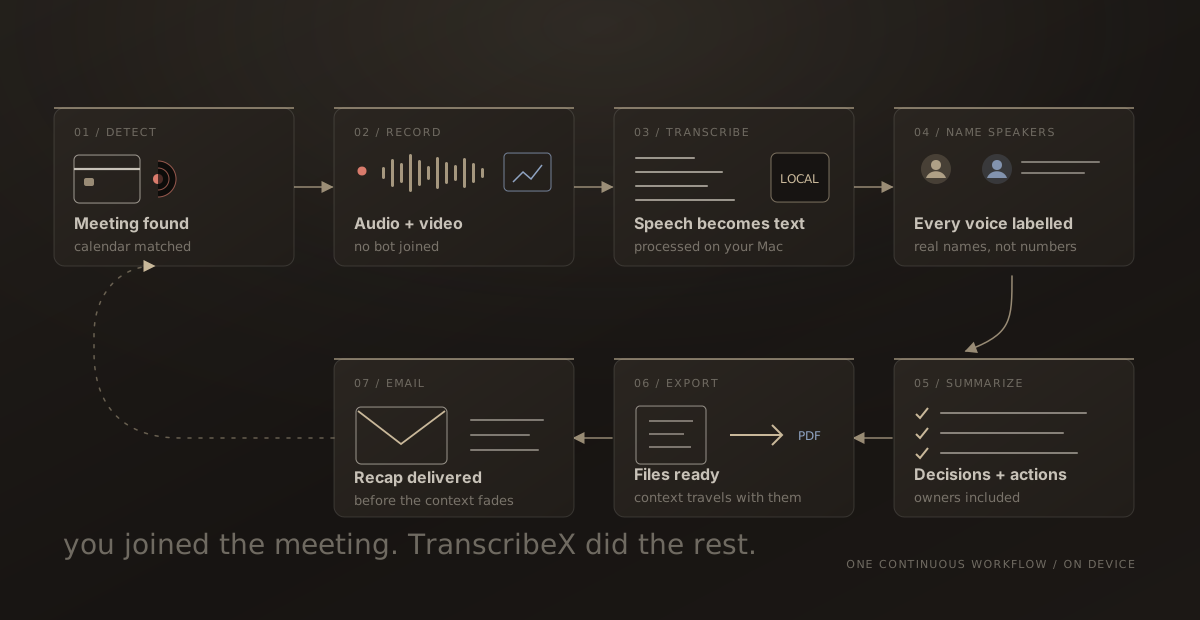
- Turn on detection for Google Meet. In the detection settings, enable Google Meet and choose audio only or audio and video. Pick a model, and decide whether the summary, export and email should run automatically.
- Join the call and let people know. Recording starts shortly after the meeting begins. When it ends, TranscribeX transcribes it on your Mac, labels the speakers and writes the summary if you turned that on.
If your Google Calendar is one of the calendars on your Mac, TranscribeX can match the call to its event and name the recording after it. For text during the call, the live transcript window runs on NVIDIA Nemotron streaming models in 30+ languages and has an AI chat panel. If you already have a Meet recording downloaded from Drive, drag the file into TranscribeX to transcribe it, which works in the free version.
“TranscribeX really surprised me—fast, accurate, and private. Love that it runs local AI with no extra costs for transcription.”
Why transcribe Meet locally
With Meet’s own tools, the recording and transcript live in the organizer’s Drive. That suits the organizer. If you are the guest, you may never see them. TranscribeX keeps your own copy on your Mac: the recording, a transcript with speaker names, and a summary written by a language model running inside the app. After the models are downloaded, all of that works offline. Granola also captures Meet without a bot, but it transcribes in the cloud and is a subscription. See the Granola comparison.
Google Meet transcription: FAQ
Does Google Meet have free transcription?
Not on personal Gmail accounts. Meet transcripts are available on specific Workspace editions, such as Business Standard, Business Plus, the Enterprise editions and Workspace Individual. Live captions are free for everyone but don’t save a transcript.
Why can’t I start a transcript in Google Meet?
Usually because your account’s edition doesn’t include transcripts, you are outside the host’s organization, or Host management limits it to hosts and co-hosts. Ask the organizer, or capture the call from your Mac with TranscribeX after getting everyone’s consent.
Will people see TranscribeX in the Meet call?
No. It doesn’t join the meeting, so it isn’t in the participant list and Meet shows no notice for it. Tell participants before you record.
Does Gemini need a paid plan to take notes in Meet?
Yes. “Take notes for me” needs an eligible Google Workspace edition or Google AI plan, and the organizer must have it.