Zoom has good transcription built in, but it comes with conditions. You need the right plan, the host has to start a cloud recording, and the transcript is processed and stored in Zoom’s cloud. If you are a participant on someone else’s call, or on a free account, that often means you don’t get a transcript at all. This page explains what Zoom offers natively and how to get a Zoom transcript on a Mac with TranscribeX instead.
The short version
- Zoom’s transcript needs a Pro, Business, Education or Enterprise plan with cloud recording and audio transcription turned on. Only hosts and co-hosts can start a cloud recording.
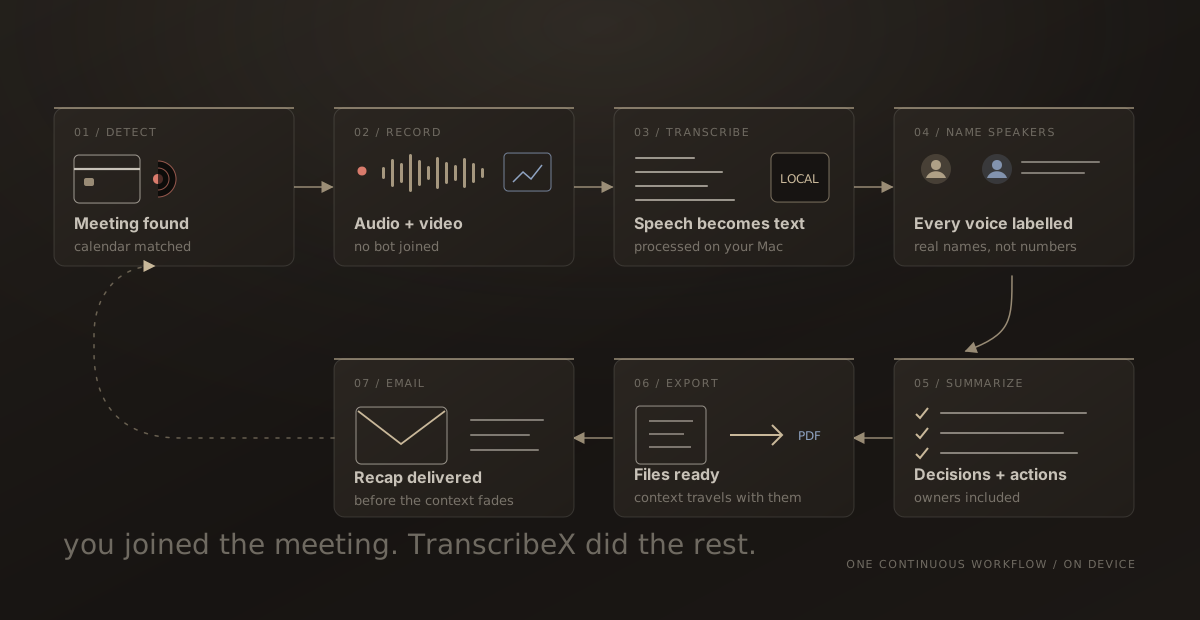
- TranscribeX detects the Zoom call, captures the audio on your Mac and transcribes it there. Nothing joins the meeting.
- Already have a Zoom recording? Drop the file into TranscribeX. Transcribing files is free.
What Zoom’s built-in transcription requires
Zoom has two kinds of text output, and they work differently.
- The transcript. Zoom generates an audio transcript after a cloud recording finishes and saves it as a VTT file next to the recording. It needs a Pro, Business, Education or Enterprise plan with cloud recording and audio transcription enabled, and it supports 19 languages. Cloud recording is paid-only, and only the host or a co-host can start it.
- Live captions. Automated captions are on by default for paid accounts. The host can restrict who turns them on, in which case participants have to ask.
Zoom’s AI Companion meeting summary needs a licensed seat on a paid Zoom Workplace plan, or the standalone $10 per month add-on. Only the host or a co-host can start it. The free Basic plan has a 40-minute limit on group meetings and no cloud recording. Zoom Pro is $15.99 per user per month on monthly billing.
Local recording to your computer is available on free and paid plans in the desktop app, but by default only the host can start it. A participant needs the host’s permission.
Zoom vs TranscribeX for Zoom transcription
| TranscribeX | Zoom built-in | |
|---|---|---|
| Who can create a transcript | ✓You, as host or participant | ?Host or co-host, through cloud recording |
| Plan needed | TranscribeX Pro, $39 once | Zoom Pro or higher (from $15.99 per month) |
| Where the audio is processed | On your Mac | Zoom cloud |
| Languages | 100+ with Whisper | 19 for transcripts, 49 for live captions |
| Speaker names | ✓Diarization and Voice Profiles | ?Not covered in the help pages we checked |
| AI summary | ✓Built-in local model, or your own provider | ✓AI Companion on paid seats or the $10/month add-on |
| Something joins the call | ✗No | ✗No (native feature) |
| Participants are notified by Zoom | ✗No, tell them yourself | ✓Recording consent prompt |
| Also works for Teams, Meet, Slack and others | ✓ | ?Zoom AI can join Teams and Meet as a participant on paid plans |
Zoom details from Zoom’s support articles on audio transcription, cloud and local recording, automated captions and AI Companion, and the Zoom Workplace Pro page, checked October 2026. Plans and features change often, so check Zoom’s help center for your account. Tell us at support@transcribex.io if anything here is out of date.
How to transcribe a Zoom meeting on Mac with TranscribeX
- Install TranscribeX. Download it from this site or run
brew install --cask transcribex. Automatic meeting recording is part of Pro. - Grant the macOS permissions. When asked, allow TranscribeX under System Settings › Privacy & Security › Screen & System Audio Recording, so it can hear the other people on the call, and allow Microphone access, so it can hear you.
- Turn on detection for Zoom. In the detection settings, enable Zoom and choose audio only or audio and video. Pick a transcription model, and decide whether the summary, export and email should run on their own.
- Join the call and let people know. Recording starts a moment after the meeting begins. When it ends, TranscribeX saves the recording and transcribes it on your Mac.
For a first test, use a short call and leave automatic email off, then check that both sides are audible and the speakers are labelled correctly. If you want text while the call is still going, open the live transcript window, which runs on NVIDIA Nemotron streaming models.
How to get a Zoom transcript without Zoom recording
Zoom’s own transcript is tied to its cloud recording, so if the host doesn’t record to the cloud, there is no Zoom transcript. TranscribeX doesn’t depend on Zoom recording anything. It captures the audio on your Mac and makes its own local recording, which stays on your machine as the source for the transcript. You don’t need host permission or a paid Zoom plan for that, but you should still ask the people on the call.
How to transcribe a Zoom recording you already have
If you have a Zoom recording file on your Mac, from a local recording or one you downloaded, you can transcribe it without recording anything new:
- Open TranscribeX and drag the file in. It imports MP4, M4A, MOV, WAV, MP3 and other common audio and video formats.
- Choose a model. The free version uses Whisper Tiny and Apple’s on-device model with no limits. Pro adds larger Whisper models, Parakeet and Qwen3 ASR.
- With Pro, turn on speaker diarization to label who said what.
- Export as TXT, Markdown, PDF, SRT, VTT, CSV or JSON.
An AI note taker for Zoom without a bot
Many AI note takers for Zoom, including Otter’s Notetaker and the Fireflies bot, join the call as an extra participant. Zoom gives hosts several ways to keep bots out, such as sign-in requirements, blocked domains and a waiting room. Because TranscribeX runs on your Mac, those controls don’t affect it, and nothing extra appears in the participant list. Otter, Fathom and Fireflies also offer bot-free desktop capture now, so the bigger difference is where the work happens. TranscribeX transcribes and summarizes on your Mac and is paid for once. See the Otter comparison.
Zoom transcription: FAQ
Does Zoom have free transcription?
Zoom’s audio transcript needs a Pro, Business, Education or Enterprise plan with cloud recording, and the free Basic plan has no cloud recording. Automated live captions are on by default for paid accounts.
Can I transcribe a Zoom meeting if I’m not the host?
With Zoom’s own tools, usually only if the host records to the cloud or gives you permission to record. TranscribeX captures the call from your Mac, so it works as a participant. Ask the host and the other participants for consent first.
Will other people see TranscribeX in the Zoom call?
No. It doesn’t join the meeting, and Zoom doesn’t show a recording notice for it. That is why you should tell people you are recording.
Can I transcribe an old Zoom recording?
Yes. Drag the recording file into TranscribeX. Importing and transcribing files works in the free version.
Does it work with Zoom in a browser?
TranscribeX detects meetings in Chrome, Safari and Brave as well as in the Zoom desktop app, and you can add other browsers to the detection list.