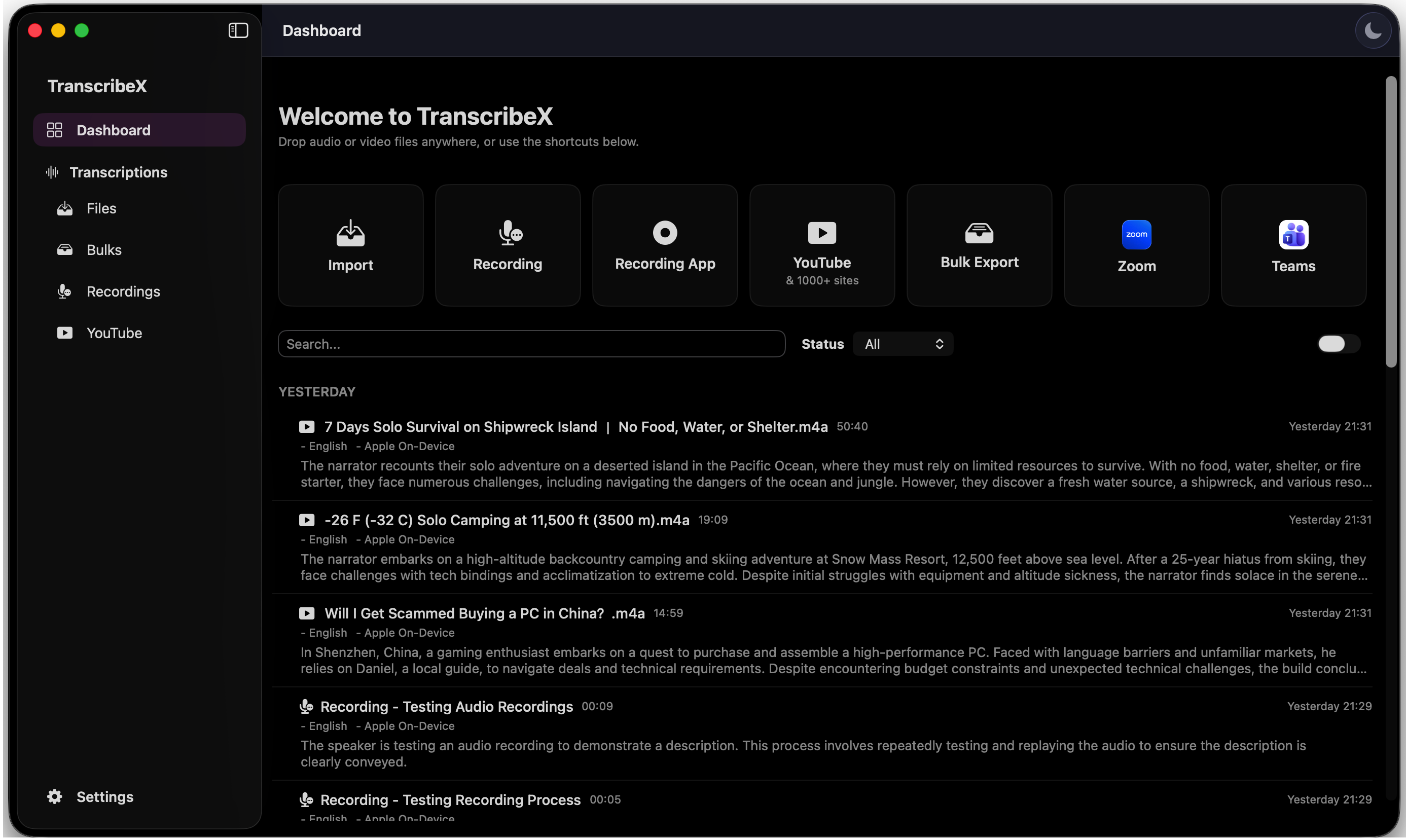
TranscribeX is the AI transcription studio that lives on your Mac — it records and transcribes your meetings automatically, captions speech in real time, types when you dictate, and summarizes it all with AI. Nothing leaves your device.
Every transcription service wants your audio on their servers. Your meetings, your interviews, your ideas — uploaded, processed, and stored somewhere you can’t see.
TranscribeX works differently. The AI models run on your Mac. Your files never leave your device. There’s no account, no upload queue, and no per-minute bill.
You drop in a file. You get a transcript. That’s the whole thing.
— The TranscribeX team
The full cycle, fully automatic
Meeting Auto-Detection
Join the meeting. That’s your only job.
TranscribeX notices when a meeting starts in Teams, Zoom, Google Meet, Slack, Discord, or any macOS app — then runs the whole pipeline on its own. It records audio and video, so the slides, screen shares, and demos are saved right alongside every word. And it does it with no bots: nothing joins your call, and nothing shows up in the participant list. You don’t press record. You don’t press anything.
No botsNothing joins your callInvisible to participants100% on-device
01Auto-detectSpots the meeting the moment it starts
02Auto-recordCaptures audio & video — slides included
03Auto-transcribeTurns speech into text as it happens
04Auto-diarizeLabels every speaker by name
05Auto-summarizeAI report with decisions and action items
06Auto-exportTranscript and summary saved where you want
07Auto-emailSummary and transcript sent to the inbox
No clicks. No babysitting. The recap is in the inbox before you’re back at your desk.
Calendar Integration
Every recording knows which meeting it was.
TranscribeX reads your Mac calendars — all of them, or only the ones you pick — and matches each recording to the event it belongs to. Recordings arrive named after the meeting, not “Recording 14”, and the event’s date, participants, and details ride along into every export and into the AI summary. Something didn’t match? Link any recording to any event by hand, in one click.
Multiple calendarsAutomatic event matchingDetails in every exportManual linking
Speaker Diarization
Every speaker, labelled. Automatically.
TranscribeX separates and labels every voice in your recording. Teach it a voice once with Voice Profiles, and you’ll never see “Speaker 1” again — just names. Perfect for meetings, interviews, and podcasts.
Voice Profiles99%+ accuracyUnlimited speakers
Live Transcription
See speech become text. In real time.
Watch the transcript build while meetings and recordings are still happening — and watch it sort itself out, too. Live speaker diarization labels each voice as it speaks, so the transcript is already attributed by the time the call ends. New streaming models cover 30+ languages in real time, with punctuation and capitalization as they go, and headphones are optional — TranscribeX keeps its own audio out of the transcript.
Live diarization30+ languagesLow latencyReal-time translation
AI Summarization
An hour of audio. The gist in seconds.
Summarize transcripts with ChatGPT, Gemini, or a fully local model through Ollama. Chat with your transcripts, ask follow-up questions, and use predefined AI prompts to speed up your workflow.
ChatGPTGeminiOllamaLocal LLMs
Dictation
Hold a key. Speak. Watch it typed.
Dictate into any Mac app — hold a key of your choice, talk, release, and the text lands right at your cursor. AI polish strips the “um”s, fixes the “Tuesday… wait, no, Wednesday” moments, and formats numbers and lists — while the speech itself never leaves your Mac. fn is all it takes.
Any appPush-to-talkAI polishCustom promptsOffline
Auto Email
The meeting ends. The recap is already sent.
TranscribeX emails the AI summary and full transcript the moment a meeting wraps up — automatically, no follow-up chore required. Prefer to look things over first? Send any meeting’s summary and transcript manually with one click. Either way, the notes land while everyone still remembers the discussion.
Every AI feature in TranscribeX — summaries, chat, dictation polish, translation — runs on whichever brain you choose.
Connect the AI you already use
Plug in any major AI service, or point TranscribeX at any OpenAI-compatible endpoint. Your keys, your models, your choice — switch providers any time.
ChatGPTGeminiDeepSeekPerplexityOllamaLM StudioCustom API
NO API · NO COST
Or start a local LLM inside TranscribeX
One click downloads a local model that runs right inside the app. No API key, no account, no subscription, no per-token bill — and your transcripts never leave your Mac.
QwenGemmaApple Intelligence100% offline$0 forever
Summarize
One click turns a full meeting into a report — key points, decisions, and action items. Your own notes get woven into the summary too.
Chat
Ask your transcripts anything — follow-up questions, clarifications, even “what did Sarah say about the budget?” Conversations are saved, with full Markdown replies.
Prompts
Predefined prompts for the common jobs, plus unlimited custom prompts you write once and reuse everywhere — summaries, chat, and dictation polish.
Transcription Models
Pick the engine that fits. Or try them all.
Every model downloads once and runs entirely on your Mac — switch engines per job, per language, or per mood.
OpenAI Whisper
The accuracy benchmark. Every size from Tiny to Large V3 Turbo, transcribing 100+ languages with best-in-class precision.
NVIDIA Parakeet
The speed engine. Up to 20× faster than Whisper with balanced accuracy, plus low-latency streaming variants.
NVIDIA Nemotron New
The live engine. Streaming recognition in 30+ languages with punctuation and capitalization as you speak — the model behind live captions and live diarization.
Qwen3 ASR
Modern multilingual recognition with a forced-aligner companion model for precise word-level timestamps.
Apple On-Device
The speech engine built into macOS — nothing extra to download, instant startup, and 30 locale variants.
Fine-tuned Whisper — optimized for your language
German
Swiss German
Chinese
Korean
Arabic
Slovak
Catalan
French
Hebrew
Hinglish
+ more
Community fine-tunes of Whisper Large V3, each trained specifically for one language — noticeably better than the general model on accents, names, and local phrasing.
The list keeps growing — don’t see your language? Request it and we’ll add it.
File Import
Drop a file. Any file. Or a whole folder.
Drag audio or video straight into TranscribeX — or point it at a folder and it transcribes new files as they arrive. Queue hundreds at once with batch transcription, then play everything back with the built-in player.
“TranscribeX has been great! I am on 20+ calls weekly and this tool has become invaluable for call transcripts, and without any subscription or sending my data off to the cloud! I've emailed support on a few occasions and Ethan has been extremely responsive, top notch support!”
Tim
“TranscribeX really surprised me—fast, accurate, and private. Love that it runs local AI with no extra costs for transcription.”
L Wang
“Very useful for your meetings!!”
Sergio Obolevich
“The app is intuitive and well done. The developer keeps actively developing the app, and I enjoy the wide support of various transcription models. Plus being able to download videos, create subtitles and translate them within the same app, with just a few clicks — this is a great piece of software!”
Marek Tomasovic
“I've bought it and was very happy with the performance. Now I suddenly got the ability to do dictation which makes me very happy too. Keep improving it! Thanks Ethan”
Heng Wu Ye
“Great app. Developer is very responsive and is actively adding new features!”
Patrick Patterson
“Just works. Stable on my M1 iMac. Good UI. Fast. Stable. Very happy with my purchase.”
Verified customer
“The developer is incredibly responsive, fixed my reported issue in record time! The app now works beautifully, is lightning fast, and the experience overall is seamless. Truly impressive support and a fantastic product.”
Verified customer
“This application stands out with its excellent features. Transcriptions are instantly available, making it easy to start working on any YouTube video or meeting notes. Its interactivity sets it apart from many other software programs.”
Verified customer
“Great product. One place to capture all your transcripts.”
P W Jayawickrama
“Excellent app which works very well and is definitely worth the purchase price”
Jim Chapman
“great little app—get off the cloud ;)”
Brendan Howley
Frequently asked questions
Yes. The free version includes unlimited transcription with the Whisper Tiny and Apple On-Device models, dictation, YouTube downloads, and TXT export — no trial clock, no watermarks. Pro unlocks the faster, more accurate models plus meetings, diarization, and the AI features.
Yes. Transcription, speaker diarization, and translation all run locally on your Mac — your audio never leaves your device. Online services (like ChatGPT summaries or ElevenLabs models) are strictly optional and only used if you connect them yourself.
TranscribeX detects when a meeting starts in Teams, Zoom, Google Meet, Slack, Discord, or any macOS app, then records it (audio and video), transcribes it, labels the speakers, generates an AI summary, exports everything, and can even email the summary and transcript — automatically. Join the call and forget about it; the full result is waiting (and sent) when the meeting ends.
TranscribeX never joins your call — there's no bot, no “recording assistant” in the participant list, and nothing added to the meeting. It captures audio directly on your Mac. Do note that depending on your location, you may be legally required to tell participants a meeting is being recorded — that stays in your control.
With Whisper Large V3 or a fine-tuned model, accuracy is state of the art — on par with the best cloud services. NVIDIA Parakeet trades a little accuracy for 20× speed, and the fine-tuned Whisper models beat the general ones on accents, names, and local phrasing in their language.
Absolutely. Built-in speaker diarization automatically separates and labels every voice — including during live transcription, where each speaker is labelled as they talk. Teach TranscribeX a voice once with Voice Profiles and it will greet that speaker by name in every future transcript — no more “Speaker 1.”
Audio: MP3, WAV, M4A, AAC, FLAC, OGG, WMA, AIFF. Video: MP4, MOV, M4V, MKV, AVI, WebM, WMV, FLV. You can also capture live audio from any macOS app, record from the microphone, and export transcripts to TXT, SRT, VTT, PDF, CSV, and Markdown.
Over 100 languages for transcription, with dedicated fine-tuned models for German, Swiss German, Chinese, Korean, Arabic, Slovak, Catalan, French, Hebrew, and Hinglish. Live transcription covers 30+ languages with the streaming NVIDIA Nemotron models. Transcripts can also be translated — after the fact or in real time during live captions.
No. TranscribeX can download a local LLM that runs inside the app — summaries, chat, and dictation polish with no API key, no account, and no per-token cost. If you prefer, you can also connect ChatGPT, Gemini, DeepSeek, Perplexity, Ollama, LM Studio, or any OpenAI-compatible endpoint.
No. Pro is a one-time $39 payment — yours for life, with free updates. One license covers one Mac at a time, and there's a 7-day refund policy if it's not for you.
TranscribeX works on most modern Macs. An Apple Silicon Mac speeds up transcription significantly — the models use the Neural Engine — but it isn't required.
Three ways: it runs on your Mac instead of the cloud, so recordings and transcripts never leave your device; it records without sending a bot into your meetings; and it's a one-time purchase instead of a monthly subscription with per-minute limits.
Try TranscribeX free today.
Unlimited free transcription. Pro is $39 one-time — no subscription.