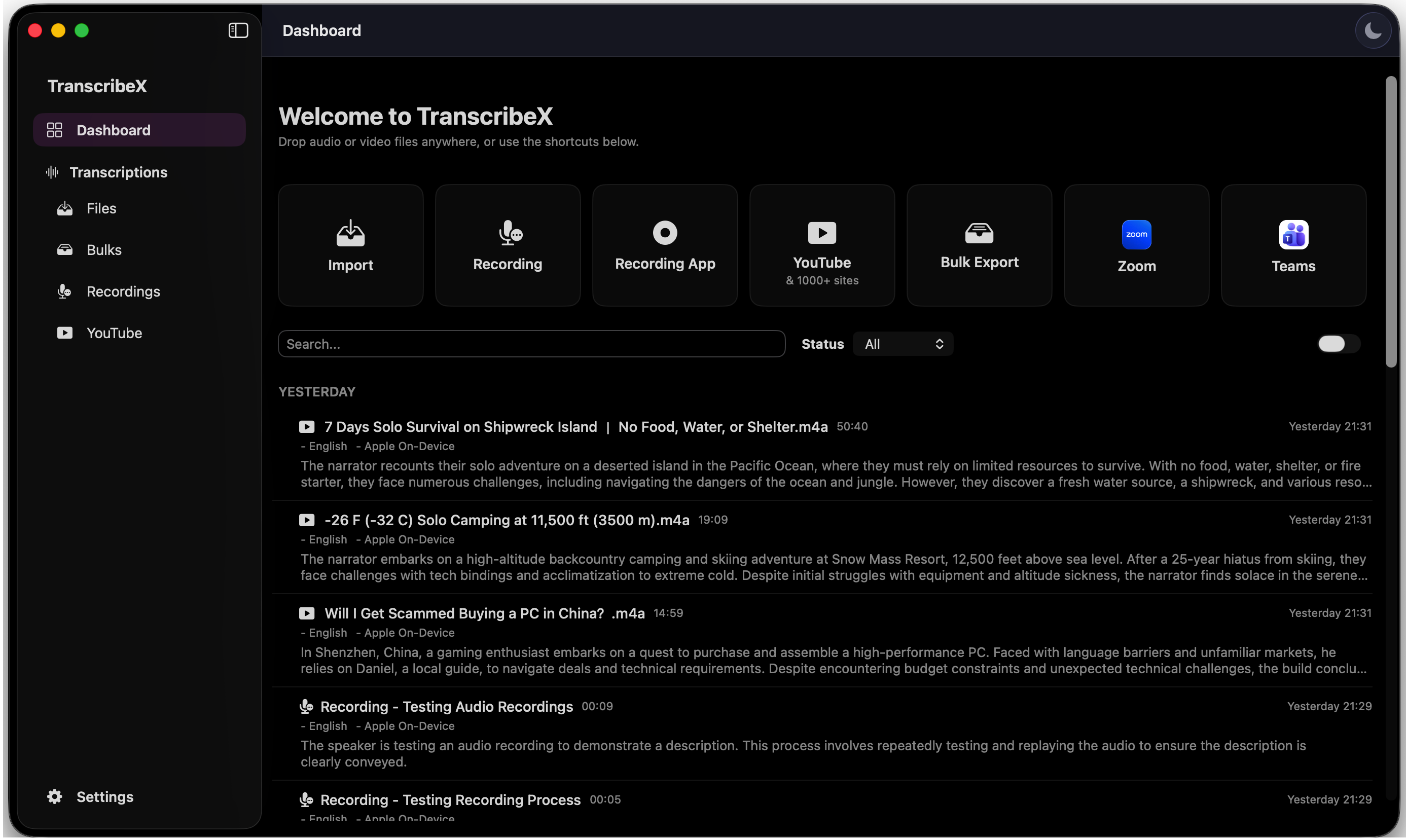
A conversation can contain the decision that moves a project forward, the sentence that unlocks an article, or the customer insight your team cannot afford to lose. Yet recovering that value often means inviting another bot, uploading sensitive audio, watching a usage meter, and paying another monthly bill.
TranscribeX takes a different route. It is a complete AI transcription studio built for macOS. It captures meetings without joining them, turns live or recorded speech into searchable text, recognizes speakers, creates summaries and action items, and can send the finished recap automatically. Its core transcription, diarization, translation, and optional AI workflows can run on your Mac, so your recordings do not need to leave the device.
What is TranscribeX?
TranscribeX is a native Mac application that turns speech into useful work. It can transcribe an audio or video file, record your microphone, caption a conversation in real time, or detect and capture the audio from an online meeting. The result is not merely a wall of text: TranscribeX can align words to the recording, separate speakers, learn their names through Voice Profiles, translate the transcript, and generate an AI report with key points, decisions, and next steps. You can explore the complete TranscribeX feature set on the product page.
You choose the engine behind that work. TranscribeX supports OpenAI Whisper models from Tiny through Large V3 Turbo, NVIDIA Parakeet for high-speed transcription, Qwen3 ASR with word alignment, Apple’s on-device speech engine, and language-specific Whisper models. Different recordings need different trade-offs; the app does not lock you to a single model.
From “meeting started” to “recap sent”
The most striking TranscribeX workflow begins before you touch the app. It can detect meetings in Zoom, Microsoft Teams, Google Meet, Slack, Discord, and other macOS applications. Because it records from your Mac, no assistant appears in the participant list and no bot waits to be admitted.
That sequence can run automatically. Calendar details can name and enrich the recording; the transcript can highlight the word currently playing; and the final summary and transcript can arrive by email before the meeting fades from memory.
Recording rules vary by location and circumstance. A bot-free experience does not remove your responsibility to notify participants and obtain consent when the law or your organization requires it. TranscribeX leaves that communication in your hands.
Why is TranscribeX different?
The central difference is control. Many transcription products are cloud services first: audio is sent away for processing and stored in an online workspace. That can be a reasonable choice for teams that prioritize browser collaboration. It is not the only possible architecture.
TranscribeX lets the Mac do the work. Local transcription means the audio does not have to cross the internet, there is no upload queue, and an internet outage does not stop the core workflow. Speaker diarization and translation can stay local too. If you want AI summaries or transcript chat without an outside service, you can download a local language model inside the app. If you prefer ChatGPT, Gemini, DeepSeek, Perplexity, Ollama, LM Studio, or another OpenAI-compatible endpoint, you can connect it yourself.
Private by architecture
Core processing can happen on the Mac instead of requiring audio and transcripts to be stored in a third-party cloud.
Invisible meeting capture
Record system audio without adding an automated participant to the call.
Your choice of AI
Switch transcription engines and use a local LLM or the online AI provider you already trust.
No metered anxiety
Basic transcription is unlimited in the free edition; Pro does not charge by the minute or renew every month.
More than meeting notes
Meetings are only one source of speech. TranscribeX accepts common audio and video formats, downloads media from YouTube and more than 1,000 supported sites, monitors folders for new files, and queues large batches for transcription and export. Editors can search and replace across a transcript, merge or split segments, correct speakers in bulk, and export TXT, SRT, VTT, PDF, CSV, or Markdown.
Dictation turns the same transcription engine into a writing tool. Hold a shortcut, speak naturally, and insert the result into any Mac app. Optional AI polish can remove filler, clean the grammar, or reshape the text with a reusable prompt. Live Caption provides low-latency text and real-time translation, while CLI and MCP support open TranscribeX to automated and AI-assisted workflows.
This breadth matters because it replaces a chain of narrowly focused services. One application can capture a call, transcribe an interview, create subtitles for a video, translate a lecture, draft an email by voice, search a recorded archive, and summarize everything afterward.
Who should use TranscribeX?
TranscribeX is designed for people who produce value from spoken information—and who want to keep that information under their control.
Professionals and teams
Capture decisions, owners, deadlines, demos, and screen shares without assigning someone to take minutes.
Researchers and students
Turn interviews, lectures, field recordings, and multilingual sources into searchable research material.
Journalists and legal professionals
Keep sensitive source audio or client conversations on the Mac while producing editable, reviewable transcripts.
Podcasters and video creators
Process long recordings in batches, identify guests, edit the text, and export timed subtitles.
Writers and developers
Dictate into any application, polish the result, or automate transcription through the command line and MCP.
Multilingual and accessibility users
Use more than 100 transcription languages, specialized models, live captions, and real-time translation.
How does TranscribeX compare with cloud notetakers?
Otter and Fireflies are capable cloud collaboration products. Their online workspaces and team analytics may be the right fit for some organizations. TranscribeX is the better fit when local processing, workflow breadth, model choice, offline operation, or lifetime pricing matters more.
| Consideration | TranscribeX | Otter | Fireflies |
|---|---|---|---|
| Core processing | Runs locally on the Mac | Audio is processed in cloud infrastructure [source] | Data is processed in U.S. cloud infrastructure by default [source] |
| Meeting capture | Bot-free system-audio capture | Supports Otter Notetaker and desktop capture | Supports a Notetaker bot and desktop system-audio capture [source] |
| Free transcription | Unlimited with included local models | 300 minutes per month and 30 minutes per conversation [source] | Unlimited live meeting transcription, with storage and credit limits [source] |
| Paid model | $39 one-time Pro license | Recurring subscription | Recurring per-seat subscription |
| Beyond meetings | Dictation, live captions, batch files, site downloads, translation, CLI and MCP | Meeting notes and conversation collaboration | Meeting intelligence, collaboration, and integrations |
Comparison checked August 26, 2026. Sources: Otter plans and limits, Otter Terms of Service and cloud-processing disclosure, Fireflies pricing, Fireflies desktop capture guide, and Fireflies data storage guide. Product plans change; check each provider before purchasing.
The privacy distinction is architectural, not a suggestion that every cloud product is careless. Otter says its service processes audio in cloud infrastructure and uses encrypted AWS storage. Fireflies says its default service processes and stores data in U.S. cloud infrastructure with encryption and offers private storage for Enterprise customers. TranscribeX removes that transfer from the core local workflow altogether. By inference, this applies a broader data-minimization principle to transcription: the U.S. Federal Trade Commission’s IoT privacy report explains that limiting unnecessary collection and retention reduces the exposure created by large stores of personal data.
What do you get for free?
The free version is not a ticking trial. It includes unlimited transcription and TXT export with Whisper Tiny and Apple On-Device models, local audio and video import, microphone recording, dictation in any Mac app, YouTube and supported-site downloads, transcript editing, search and replace, dictionary corrections, tags, media playback, and CLI/MCP automation.
Pro unlocks the complete studio: larger and specialized transcription models, NVIDIA Parakeet, automatic meeting-audio capture, speaker diarization and Voice Profiles, live captions, real-time translation, AI summaries and chat, batch processing, folder monitoring, automatic exports and email, and professional output formats. The standard price is $39 once, with free updates and a seven-day refund window. See the current Free and Pro plan details before purchasing.
Why choose TranscribeX?
- Choose it for ownership. Your original recordings and core transcripts can remain on hardware you control.
- Choose it for focus. Meetings can be captured and processed without managing a visible bot or a seven-step checklist.
- Choose it for flexibility. Pick the speech model, language model, export format, and workflow that fits the job.
- Choose it for range. The same app handles meetings, existing media, live captions, translation, subtitles, and dictation.
- Choose it for lasting value. Start with unlimited free transcription, then buy Pro once if you need the full workflow.
No transcription app is right for everyone. If your organization needs a browser-first social workspace and centralized team analytics above all else, a cloud platform may suit you. But if you use a Mac and want private, powerful transcription without handing every conversation to another recurring service, TranscribeX deserves to be the first app you try.
Frequently asked questions
Does TranscribeX work without the internet?
Yes. Downloaded transcription models, speaker diarization, supported translation, and local AI models can run offline. Optional online transcription or AI providers require a connection only when you choose to use them.
Will a TranscribeX bot join my meeting?
No. TranscribeX captures audio directly on your Mac, so it does not add a participant to the call. You must still follow the recording-consent rules that apply to you.
Can TranscribeX tell speakers apart?
Yes. Pro includes speaker diarization, and Voice Profiles can associate recurring voices with names instead of generic speaker numbers.
Do I need an API key for summaries and transcript chat?
No. You can install a local LLM inside TranscribeX. Connecting ChatGPT, Gemini, Ollama, or another compatible service remains optional.
Which Macs are supported?
TranscribeX works on most modern Macs. Apple Silicon improves transcription performance because supported models can use Apple’s accelerated hardware, but it is not required.
Your meetings are already valuable.
Stop sending them somewhere else. Download TranscribeX, transcribe your first recording free, and keep the conversation where it belongs.
Editorial method: product details were checked against the public TranscribeX feature and pricing pages and the version 9.2.33 changelog on August 26, 2026. Competitor details were checked against the official sources linked above.